PROMPTED keynote
Pr TM Mkhize
The keynote presentation shared after the summit.
Download PPTX ↓THE LEARNING CONTINUES
Revisit the summit. Share what you learnt. Put it to work in your church.
Summit resources are public. No account or sign-in required.
SUMMIT RESOURCES
Pr TM Mkhize
The keynote presentation shared after the summit.
Download PPTX ↓Karabo Mitileni
Help visitors find your church and its essential information online.
Download PPTX ↓Johnny de Almeida
Practical support for creating content with your phone.
Download PPTX ↓Reece Anderson
Gather the fragments and turn one message into content for the week.
Download PPTX ↓Otieno Mkandawire
Use a clear, consistent Adventist identity in your church communication.
Download PPTX ↓Thulani Mkhize
Build sustainable communication habits with the team you have.
Download PPTX ↓Jan du Toit
View the full presentation in your browser. No sign-in required. This is a large file.
View presentation ↗Jan du Toit
Watch the supporting launch video in your browser. No sign-in required.
Watch video ↗The supplied Advent Sans Logo font for entity identifiers.
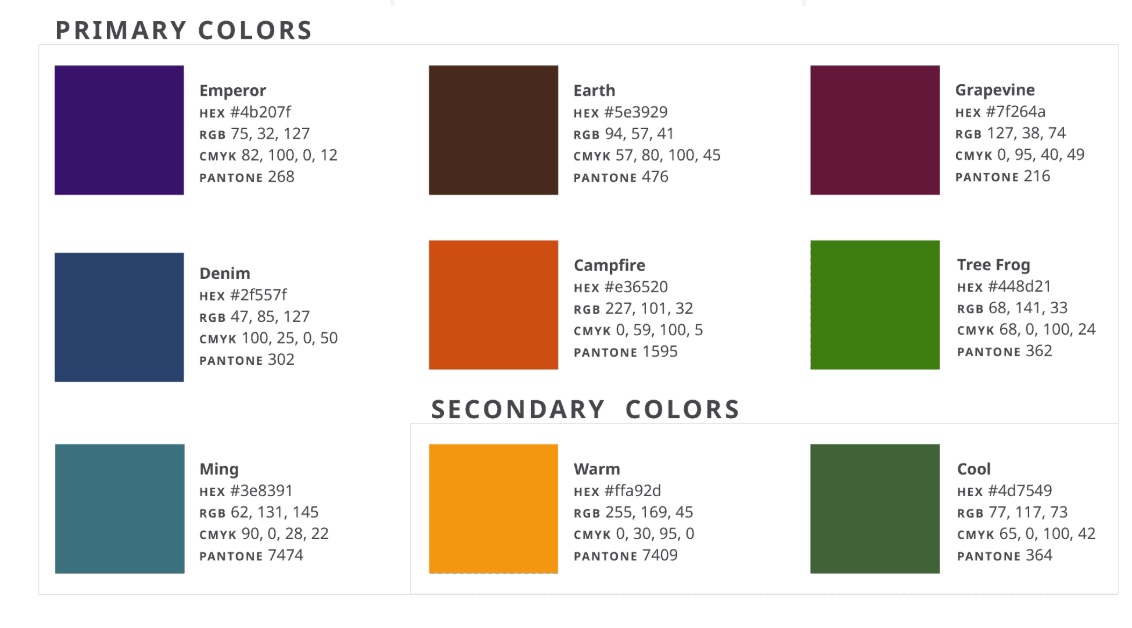
Download OTF ↓The colour panel supplied with the summit resources.
Download JPG ↓Watch the introductory identity guidance video.
Download MP4 ↓A practical starting point for your church communication journey.
Download PDF ↓Check back as further summit material is released.
Use this resource page when sharing summit material. Each file has its own public access link.
Choose tools your church can sustain. Check current terms and limits, and review material before use.
MissionWorks
Prepare a church bulletin with confirmed information and review it before sharing.
Explore the official resource ↗MissionWorks
Build a clear brief for content, with purpose, audience, facts and review boundaries.
Explore the official resource ↗MissionWorks
Create a poster with exact wording and an approved identifier.
Explore the official resource ↗MissionWorks
Prepare an identifier with the church identity tool and review the result against official guidance.
Explore the official resource ↗Official guidance
Identity guidance, approved symbol files, Advent Sans and the Creation Grid.
Explore the official resource ↗Official guidance
Use Google’s official access and verification process before updating a church listing.
Explore the official resource ↗Platform resource
Explore group conversations and admin controls. Agree who manages the group and how members join.
Explore the official resource ↗Platform resource
Explore a channel for sharing church updates. Choose the format that fits your purpose.
Explore the official resource ↗Editing options
Explore manual video editing as an alternative to automatic clipping. Check available features and export limits.
Explore the official resource ↗Optional tool
An optional automatic clipping tool. Compare current free and paid limits before requesting a budget; review every clip for context.
Explore the official resource ↗Responsible AI
Explore drafting or adapting nonconfidential text. Check current limits, verify the output and keep human review before sharing.
Explore the official resource ↗Additional guides and templates will appear as they are approved and released.